Thursday, April 18, 2013
Things # 17 - Tagging and social bookmarking with Delicious
Okay, let us see. Tagging and social bookmarking can be used for many things. It can be used recreational, personal, and most importantly, in the classroom. I created an account with Delicious and searched the tags "educational" and "technology". I good see the comments and tags that people have added. One tag was Web 2.0 ;-). Of course this could be used in the classroom. This is perfect when researching specific content!

Thing #16 - Get Organized with Web 2.0 Tools
I'm sure as you all can tell. I am a big fan or organization. Anything that can help me get organized, I am definitely a fan of. I was asked to check out a customized start page and I tried one on iGoogle. I love this feature! I can make it look cute and girly as well as put anything I am interested in right at my finger tips.
I also enjoyed trying out the online calenders, and the to-do lists. Although they look nice to use, I am not a fan. Maybe if I was not a communiting college student, I could find more use of them. I would recommend them be used for people who work on the same computer often or on an office computer strictly for work. I will just stick with my pencil and paper though, for now. Still, these are great tools for people of interest. They are definitely worth a look into.
I also enjoyed trying out the online calenders, and the to-do lists. Although they look nice to use, I am not a fan. Maybe if I was not a communiting college student, I could find more use of them. I would recommend them be used for people who work on the same computer often or on an office computer strictly for work. I will just stick with my pencil and paper though, for now. Still, these are great tools for people of interest. They are definitely worth a look into.
Thing #15 - What in the world is a Wiki?
I am still in awe over all of the resources that are available that I had absolutely no idea about. Today I explored Wikis. I knew of Wikipedia and had used it for information for as long as I can remember. I played around with the APSU sandbox and I came to a brilliant idea on how Wiki could be used in the classroom. I could create a Wiki for my classrooms! I would have students log on and post study techniques for different concepts that we learn in class. This way, if a student is stuck on a certain concept, they could log onto the Wiki and see the way different students have figured the answers. Wrong answers could be corrected with right answers, and hopefully not vise versa. This is definitely an option with the expansion of Web 2.0!
Thing #14 - Go With the Flow
I have taken a break on posting for a while, but I am now back at it again. Today, I am looking at flowcharts and mind maps. I have been exploring the Gliffy flowchart and the Bubble.us mind maps. Gliffy seems like a great resource for people that are fond of flow charts. I am not one of those people. I did really enjoy the Bubble.us mind map though. This could definitely be a great resource for an outline for a paper. I plan on using this more my final essay that I have in my World Literature Class.
Tuesday, March 19, 2013
Thing #13 - Web-based Applications
There are many growing web-based application that encourage collaboration. I don't think they will take the place of Office but, like what was said in the 23 things blog, they definitely have their place. I have experience of Google Docs from my Education 2100 class, and I absolutely loved it. I found Zoho to be somewhat difficult to understand. It was hard to find the actual Writer, and I had difficult making an account. Google Docs is completely connected with your good account, making it very accessible and easy to navigate. Students would love collaborating over Google Docs for a project, or group assignment. It would be nice for them to be able to collaborate in the privacy of there own home, in their pajamas, but still learning. I have included an example of a Google Doc in the following link. Check it out! https://docs.google.com/document/d/1a3PcU6m4F9gebbbhnqZh9IInR6JxMKdOnB-lPXiyJD8/edit?usp=sharing
Tuesday, March 5, 2013
Thing #12 - Google is not just for searching anymore
I have found many uses to use Google for other than searching (Although, searching is by far my favorite). I use my Gmail account daily. I have become very found of Blogger. I also thoroughly enjoy using the Collaboration tool through Gmail. It does not stop their though.
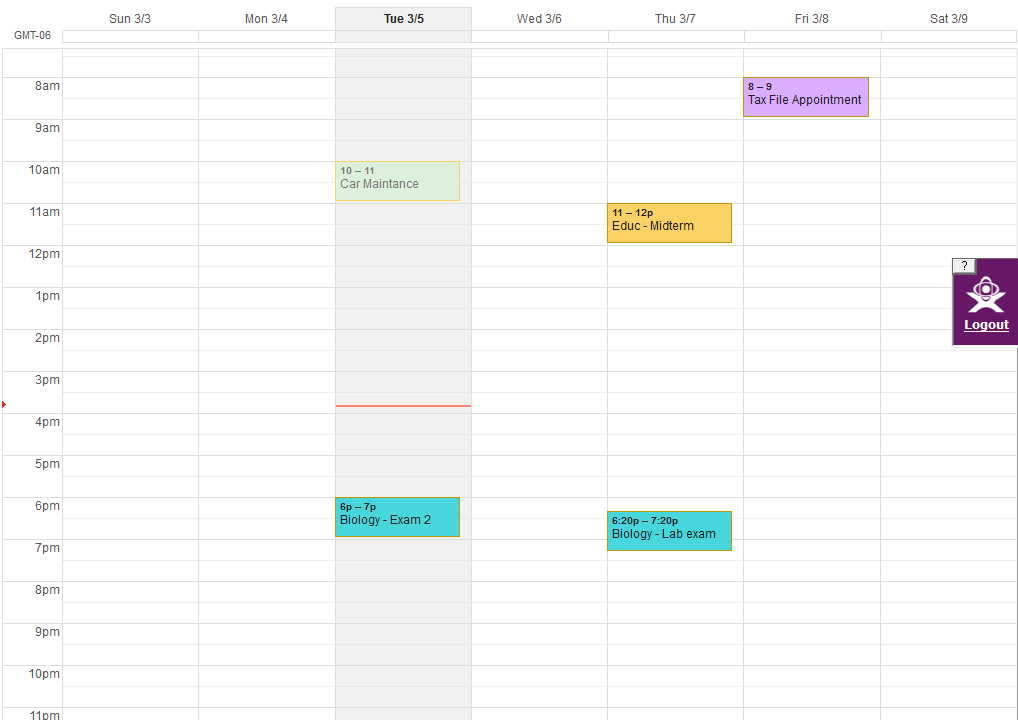
As we were asked I explored Google Calender, and I must say I am thinking I may switch from my writing planner to this! I will search for an application for my iPhone and if I find it, I am definitely making the switch. I explored the calender a bit and I am including a screen shot of it as follows:
As we were asked I explored Google Calender, and I must say I am thinking I may switch from my writing planner to this! I will search for an application for my iPhone and if I find it, I am definitely making the switch. I explored the calender a bit and I am including a screen shot of it as follows:
I like the fact that I can color code my appointments and assignments. That is a great tool for organization.
Thing # 11 - Finding Good Feeds
I found some great feeds using that blog search tools that were provided for us. I found feeds that, again, pertained to my aspiring teaching career that I could use for future reference and feeds for my own personal use. I really liked using the Google Blog search. It was very simple and almost identical to the search engine that I use on a daily basic. Technorati was pretty simple overall, as well. I thought Topix was very confusing. I could barely find the search bar and the website had adds all over the page. That is an instant turn off for me.
Subscribe to:
Posts (Atom)