Finally! I have reached the end of my 23 things journey. I feel as though this was an excellent activity. I was learning, but having fun at the same time. My favorite exercise, by far, was Thing #22. I have a knack for organization, and this is just perfect. I have used bookmarks, but those can easily get messy. Plus, I never actually look back on those. I can save all the resources that I obtain throughout my college career to a neatly prioritized online binder.
Over all, I took away so much of from this activity. There is not one thing that I would change to make it any better than it already is. I have discovered resources that I had no idea were available to me that I will be able to use in my future career. I will definitely be keeping up with some of my tagged RSS feeds so I am able to keep up with the journey of Web 2.0. I cannot wait to use some of these tools for the future in my classroom!
Tuesday, April 23, 2013

Things #23 - Creative Commons

Monday, April 22, 2013
Thing #22 - Keepin' it Together: Livebinders
Wow! This one great. I have finally found a organization resource that I like. Livebinders is by far my favorite! It reminds of Diigo's concept, expect with even more organization. I'm going to use this to organize my favorite Diigo resources. I made binders titled for use their specific use (Students, Teacher, Standards). I used my "Student" binder to store all of the resources for students that I found most useful from the Diigo group 3040/5040. The same concept goes with my other two binders. I have embedded a link to my "Teacher" binder as follows:
![]()
Teacher
This could become an excellent resource for use in the classroom. I would store an entire lesson inside of a binder, and students could visit the websites in the ordered tabs to complete work and concepts.
This could become an excellent resource for use in the classroom. I would store an entire lesson inside of a binder, and students could visit the websites in the ordered tabs to complete work and concepts.
Thursday, April 18, 2013
Thing #21 - Animoto
Amito is an awesome resource. I would be great for the kids to use since it is super easy! They would love it.
Thing #20 - You, Too, Can YouTube
I ultimately enjoy using YouTube for entertainment purposes. I like to watch people falling down the stairs and others making a fool of themselves as much as the next person. YouTube could be used for educational purposes as well. There is a great feature if you find a person's videos that you enjoy watching. You can add their channel to your page. You are able to access it from any computer and watch the videos that they have up loaded to their channel. Also, once you watch a video it directs you to other videos or similar interest. This would be a great feature if it were applied to the Austin Peay library website. There is also an app for iPhone that I use. I am able to let my daughter watch Elmo where ever there is WiFi or 3G ;-).
My standard involves 3rd grade mathematics, therefore I have embedded a YouTube video that is related to my standard.
My standard involves 3rd grade mathematics, therefore I have embedded a YouTube video that is related to my standard.
Thing #19 - Other Social Networks
Phew! Who knew there were so many other social networking sites out there. I researched some of the ones listed on the 23 things blog. TeacherPop is really neat! I am currently waiting for administration acceptance. I also explored last.fm and I absolutely love it. I normally use Pandora to listen to music, but I enjoy this one so much better. It can sink the songs you normally listen to onto you last.fm account with just a click of a button, using Scobble! Check these out and give them a try!
Thing #18 - Explore Social Networking
There is not much need for the exploration of Facebook and Twitter during this day in time for the people around my age. I, for one, use these social networking sites every day. I know each of these like the back of my hand. I find Facebook to be the most useful. You are easily directing to things that interest you and people that you may know. The down fall of Facebook is that the a lot of the time, a well known famous people that you follow could quite possibly not be who you think they are. On twitter, it is more than likely the person you see tweeting on your screen and it is also more simplified for less distraction. There is one thing that you must remember. It is important to know that, as a teacher candidate, it is extremely hard to block everything on your face. You must watch what you put on a social networking site because almost anyone can see the things that you put on there.
Here is a link to my Facebook page - https://www.facebook.com/jbaggett2?ref=tn_tnmn
Here is a link to my Facebook page - https://www.facebook.com/jbaggett2?ref=tn_tnmn
Things # 17 - Tagging and social bookmarking with Delicious
Okay, let us see. Tagging and social bookmarking can be used for many things. It can be used recreational, personal, and most importantly, in the classroom. I created an account with Delicious and searched the tags "educational" and "technology". I good see the comments and tags that people have added. One tag was Web 2.0 ;-). Of course this could be used in the classroom. This is perfect when researching specific content!
Thing #16 - Get Organized with Web 2.0 Tools
I'm sure as you all can tell. I am a big fan or organization. Anything that can help me get organized, I am definitely a fan of. I was asked to check out a customized start page and I tried one on iGoogle. I love this feature! I can make it look cute and girly as well as put anything I am interested in right at my finger tips.
I also enjoyed trying out the online calenders, and the to-do lists. Although they look nice to use, I am not a fan. Maybe if I was not a communiting college student, I could find more use of them. I would recommend them be used for people who work on the same computer often or on an office computer strictly for work. I will just stick with my pencil and paper though, for now. Still, these are great tools for people of interest. They are definitely worth a look into.
I also enjoyed trying out the online calenders, and the to-do lists. Although they look nice to use, I am not a fan. Maybe if I was not a communiting college student, I could find more use of them. I would recommend them be used for people who work on the same computer often or on an office computer strictly for work. I will just stick with my pencil and paper though, for now. Still, these are great tools for people of interest. They are definitely worth a look into.
Thing #15 - What in the world is a Wiki?
I am still in awe over all of the resources that are available that I had absolutely no idea about. Today I explored Wikis. I knew of Wikipedia and had used it for information for as long as I can remember. I played around with the APSU sandbox and I came to a brilliant idea on how Wiki could be used in the classroom. I could create a Wiki for my classrooms! I would have students log on and post study techniques for different concepts that we learn in class. This way, if a student is stuck on a certain concept, they could log onto the Wiki and see the way different students have figured the answers. Wrong answers could be corrected with right answers, and hopefully not vise versa. This is definitely an option with the expansion of Web 2.0!
Thing #14 - Go With the Flow
I have taken a break on posting for a while, but I am now back at it again. Today, I am looking at flowcharts and mind maps. I have been exploring the Gliffy flowchart and the Bubble.us mind maps. Gliffy seems like a great resource for people that are fond of flow charts. I am not one of those people. I did really enjoy the Bubble.us mind map though. This could definitely be a great resource for an outline for a paper. I plan on using this more my final essay that I have in my World Literature Class.
Tuesday, March 19, 2013
Thing #13 - Web-based Applications
There are many growing web-based application that encourage collaboration. I don't think they will take the place of Office but, like what was said in the 23 things blog, they definitely have their place. I have experience of Google Docs from my Education 2100 class, and I absolutely loved it. I found Zoho to be somewhat difficult to understand. It was hard to find the actual Writer, and I had difficult making an account. Google Docs is completely connected with your good account, making it very accessible and easy to navigate. Students would love collaborating over Google Docs for a project, or group assignment. It would be nice for them to be able to collaborate in the privacy of there own home, in their pajamas, but still learning. I have included an example of a Google Doc in the following link. Check it out! https://docs.google.com/document/d/1a3PcU6m4F9gebbbhnqZh9IInR6JxMKdOnB-lPXiyJD8/edit?usp=sharing
Tuesday, March 5, 2013
Thing #12 - Google is not just for searching anymore
I have found many uses to use Google for other than searching (Although, searching is by far my favorite). I use my Gmail account daily. I have become very found of Blogger. I also thoroughly enjoy using the Collaboration tool through Gmail. It does not stop their though.
As we were asked I explored Google Calender, and I must say I am thinking I may switch from my writing planner to this! I will search for an application for my iPhone and if I find it, I am definitely making the switch. I explored the calender a bit and I am including a screen shot of it as follows:
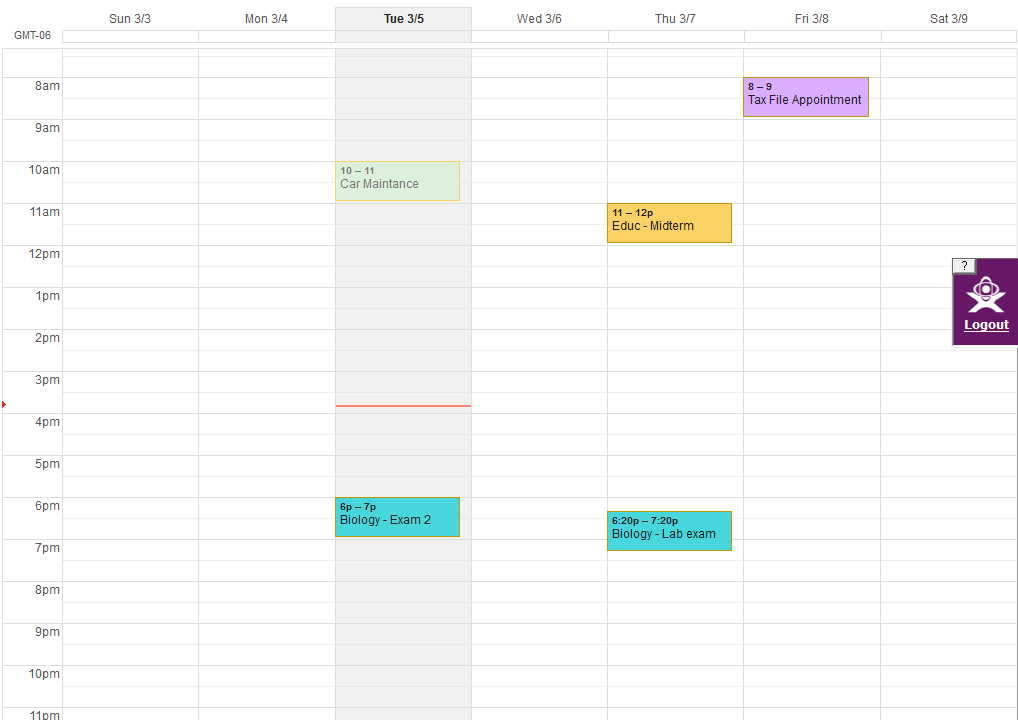
As we were asked I explored Google Calender, and I must say I am thinking I may switch from my writing planner to this! I will search for an application for my iPhone and if I find it, I am definitely making the switch. I explored the calender a bit and I am including a screen shot of it as follows:
I like the fact that I can color code my appointments and assignments. That is a great tool for organization.
Thing # 11 - Finding Good Feeds
I found some great feeds using that blog search tools that were provided for us. I found feeds that, again, pertained to my aspiring teaching career that I could use for future reference and feeds for my own personal use. I really liked using the Google Blog search. It was very simple and almost identical to the search engine that I use on a daily basic. Technorati was pretty simple overall, as well. I thought Topix was very confusing. I could barely find the search bar and the website had adds all over the page. That is an instant turn off for me.
Things #10 - Set Up an RSS Reader and Add Feeds
Okay, so I made my Google Readers account and this is really neat. I added some feeds for my own personal use and some for use in the classroom. This is a great tool that can be used for teachers, as well as many others. All of your information that is interesting to you is gathered in one place for you to see. That is very convenient. Teachers could use this tool for classroom, project, and many other ideas that relate to the learning use of their students.
Thing #9 - Online Image Generators
What a fun tool! This could be great for student's to use during free
time. Ir could expand their knowledge of Web 2.0, and have fun while
doing it! Here are some of my images I have generated.


Thing # 8 - Flickr Mashups
I hope you all enjoyed my photo I uploaded from Flickr. If you have time check out the rest of susivinh's photo stream!
I have explored some of the "mash ups" or branches of flickr and have discovered the Flickr Color Matcher. This resource takes photos from flickr that are the same color and puts them together. This could be a great way for elementary students to learn colors! Who knew Web 2.0 could be so pretty, too?!

I have explored some of the "mash ups" or branches of flickr and have discovered the Flickr Color Matcher. This resource takes photos from flickr that are the same color and puts them together. This could be a great way for elementary students to learn colors! Who knew Web 2.0 could be so pretty, too?!
Things # 7 - Explore Flickr
I use an application on my iPhone called Instagram, but today I am
exploring Flickr. This overall has the same concept as Instagram, but it
is a little different. I decided since I want to become a teacher, I
would search the tag "teach". I found a cute photo with an inspirational
quote that I would like to share with you all.

"The true aim of everyone who aspires to be a teacher should be, not to impart his own opinions but to kindle minds."
Things #6 - Discovering Web 2.0 Tools
I'm still really enjoying this blog. I've been trying to save my posts as drafts before I actually post them so I am able to edit as necessary.
Anyway, who knew there could be so many awesome 2.0 web tools? I explored a few different tools from the desired list, but the one that really caught my eye was Rompr. Like I have said before, I have a little girl who is now 15 months old. I am constantly looking for new ideas to introduce to her, rather it be an activity or just new healthy foods to make her for lunch. This site is perfect for this! Rompr is a social media site that allows people to post fun things they have done with your children. As soon as you become a member, it finds your location (This is still creepy to me, haha!) and automatically connects you to the posts from people in your area. if you edit your profile you can add the ages of your children, and Rompr will filter the posts that are appropriate for their age groups.You can add and invite your friends, and follow others if you are a fan of their posts. Rompr still has a way to go before it becomes a big hit like Facebook. Their are a few things that I would could possibly change or filter. Although I did not see an application app for use in a school or library, this is still a great tool for mothers!
I have provided a link to the website below. Check it out!!

Anyway, who knew there could be so many awesome 2.0 web tools? I explored a few different tools from the desired list, but the one that really caught my eye was Rompr. Like I have said before, I have a little girl who is now 15 months old. I am constantly looking for new ideas to introduce to her, rather it be an activity or just new healthy foods to make her for lunch. This site is perfect for this! Rompr is a social media site that allows people to post fun things they have done with your children. As soon as you become a member, it finds your location (This is still creepy to me, haha!) and automatically connects you to the posts from people in your area. if you edit your profile you can add the ages of your children, and Rompr will filter the posts that are appropriate for their age groups.You can add and invite your friends, and follow others if you are a fan of their posts. Rompr still has a way to go before it becomes a big hit like Facebook. Their are a few things that I would could possibly change or filter. Although I did not see an application app for use in a school or library, this is still a great tool for mothers!
I have provided a link to the website below. Check it out!!
Things #5 - Some Perspectives on Web 2.0/School 2.0 and the Future of Education
Wow! School 2.0. What is school 2.0 to me? This is our future. If we are amazed right now at all the technological resources available, just image what is to come. As a student, I am finding new ways to complete assignments and papers, and other ways to simply save my work. I have not even broke the ice on the resources that are available for teacher use in the classroom.
I do not think anyone is prepared for the future of education.Technological recourse are escalating at such a high capacity, there really is no telling what is to come.
I do not think anyone is prepared for the future of education.Technological recourse are escalating at such a high capacity, there really is no telling what is to come.
Subscribe to:
Posts (Atom)